How Video Helps Law Firms Build Trust with Potential Clients
When someone is searching for an attorney, the biggest question they have is: “Can I trust this person?”
For law firms, establishing credibility early is critical. While credentials and referrals play a role, there’s a powerful tool that immediately connects potential clients: video marketing.
Here’s how law firms can leverage video to build trust with potential clients:
Humanizing Your Expertise:
Talking to an attorney can be intimidating. Short, educational videos provide attorneys with the opportunity to simplify complex legal concepts.
Instead of scrolling through dense text, viewers see you breaking down topics clearly and confidently.
This not only demonstrates expertise but also makes the attorney approachable and trustworthy.
Create a Connection Before the Consultation
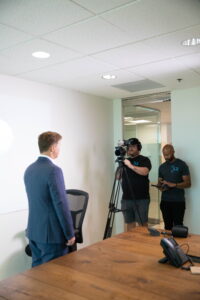
Trust isn’t built on knowledge alone. It’s built on human connection. Video allows potential clients to “meet” you before scheduling a consultation.
They hear the tone of your voice, see your body language, and get a feel for your personality.
This familiarity makes prospects more likely to reach out to your law firm because they already feel a level of comfort and rapport.
Leveraging Client Testimonials Through Video:
Testimonials have always been powerful for law firms, but video takes them a step further.
A written review is helpful, but watching a real client speak about their positive experience carries much more emotional impact.
The authenticity of a video testimonial builds credibility instantly and reassures prospects that they’re choosing the right law firm.
Conclusion
In today’s competitive legal market, video is more than a marketing trend; it’s a trust-building strategy.
By using video content to show expertise, law firms can stand out from the competition.
If you need a quote for a video project for your firm, click here: Get a Quote
How Much Should a 30-Second Video Cost?
If you’re a business owner or marketing director looking to create a short video for an ad, you’ve probably wondered: “How much should a 30-second video cost?” The short answer? It depends.
We believe in transparency to help you understand what goes into video pricing.
Here are the three biggest factors that influence the cost of a 30-second video:
1. The Type of Video You Need
Not all 30-second videos are created equal. A simple talking head video filmed in your office will cost significantly less than a cinematic brand video with actors, a script, and multiple shoot locations. Here are a few common types:
-
Social Media Ad: professional video that will be used as an ad on LinkedIn, Facebook, or Instagram
- CTV Ad: professional video that will be used as a Connected TV ad on platforms like Hulu.
-
Animated Explainer: Great for simplifying your message or showing how a product works
-
Educational Video: professional video that answers a FAQ (frequently asked question).
- Teaser Video: professional video that can be used as an opener to a podcast or show
2. Production Quality and Crew Involved

Higher-quality video means better lighting, sound, editing, and storytelling—but it also means more crew and equipment. The cost will reflect if your project requires a director, cinematographer, drone shots, or studio space.
At 12 Media Group, we typically have a production crew of 2 to 3 people to ensure the production experience is smooth and the video assets turn out amazing.
3. Post-Production
Editing your project can take as much time as filming—sometimes more.
People assume a 30-second video will be cheaper than a longer video, but that’s not always the case.
It can be more difficult to cut a video down to 30 seconds, especially if it needs to be exactly 30 seconds for certain platforms, like Hulu, for example.
So, What’s the Bottom Line?
With our company, a professionally produced 30-second video will be between $7,500 and $20,000, depending on complexity.
If you want an exact quote use our project calculator here: Calculate My Project
5 Powerful Video Types Proven to Increase Sales
The purpose of a professional video is not just to look cool. We always aim to provide a return on investment on your video project. Each video should serve a purpose to generate revenue. Here are 5 types of video that can boost sales for your company.
1. Brand Videos
Businesses that use video on their homepage see conversion rates improve by up to 80%.
(Source: Unbounce)
The videos we tend to shoot the most are brand story videos. These are great because we interview you, your leadership team, and any other key team members to share why you do what you do. We also show your process and footage of you providing your service. These are great for building trust and separating you from your competition. They also humanize your brand.
2. Event Recap Videos

If you host an event like a business conference, trade show, or corporate event, having a recap video shot can boost sales. Here’s how: one of the easiest ways to promote an event is to show what the event is like so prospective attendees know what to expect.
We were recently approached by a networking group to shoot a video of their upcoming business summit. Their main frustration was that they host this event annually, but had ZERO video footage to be able to promote this year’s summit.
These also allow you to show your company’s culture in another way besides just showing your service.
3. Drone Videos
Drone videos are excellent for boosting sales for construction companies because they show the vast scope of projects that they can handle. These can also be used to show the progress of a project and highlight the quality of your work.
We are shooting a series of videos for a commercial roofing company showing the before, during, and after of a gigantic project. They will be using this to pitch other companies with proof that they handle large projects.
4. Educational Videos
These are a great trust builder for any service builder. When you educate your potential customer throughout the buyer journey, you create a more informed buyer who’s more willing to do business with you. We try to include 3 to 5 educational videos with every video shoot project that we do. These can be posted on your website, YouTube, and social media.
5. Testimonial Videos
These may be the most powerful of the 5. If you say your company is great, you just blend in with the crowd. But if your customer tells the story of how your business was able to solve their specific problem, it will carry more weight. Having a few of these on your website that show your ideal types of clients singing your praises will be your best “salesperson”.
If you need help shooting any of these types of video to boost sales for your business, fill out the form below, and we can discuss your project.
Do You Need a Studio for Your Video Shoot?
We’re getting this question more often as more businesses move to a remote work model.
The answer is yes. We have access to a studio at Purposefull Productions in Plano.
Recently, we shot a brand video for Holmes Law Group.
The attorneys and staff are fully remote, so we were able to get all of the footage in one location in one day.
Here’s how it works.
Professional Setup

What we love about the Purposefull Production studio is that it’s usually used for podcast recording, so it’s already soundproof and fully furnished (the sets can be changed for different looks).
Before you arrive, we will bring in our professional lighting, microphones, and cameras and set everything up for the shoot.
We will then get you mic’d up for sound check.
From there, we’ll make sure you’re comfortable and get you ready to deliver your speaking parts.
Shooting Your Speaking Parts
Once we have you mic’d up and the shot framed up, we will guide you through your speaking parts.
Our production assistant and videographer will use the outline from our shot list that we created from the details of the pre-production call.
We’ll go through each speaker one at a time to deliver each topic of the video.
There is a waiting area so others that aren’t aren’t on camera yet have a place where they can wait comfortably.
B-Roll Footage
Another benefit of this studio is that we also have access to conference rooms where we can shoot B-roll footage.
This allows us to create different scenes with your employees, like a team meeting or collaboration.
We can also get aerial (drone) footage of the surrounding areas for establishing shots.
Your Next Step:
So if you’ve been considering a professional video for your company, but you weren’t sure where you would shoot it, we have you covered.
Book a call today to schedule a call to go over your project here: Get a Quote
Do You Need a Script for Your Business Video?
We were asked during a discovery call, “Do we need a script for our video?
The short answer is it depends. The overwhelming majority of the time, we would say no.
Instead, we recommend that you use an outline.
During The Pre-production Call
We have a pre-production call before every video shoot. during this call, we are going over all of the speaking points. This allows us to create a shot list and have an outline loaded on an iPad the day of the shoot.
Our Production Assistant

Our production assistant will guide each speaker through the outline of their speaking parts. They will be feeding you the topics to allow you to speak from your heart, your mind, etc.
This way it comes off a lot more natural instead of looking like a bad commercial at 2:00 in the morning.
We will “clean everything up” as far as mess-ups and do-overs in the editing process.
The Exception to the Rule
Now there is the exception of people who look great and confident reading off of a script, but also it doesn’t look like they are reading. We recently shot a video with a high-end recruiter and he was brilliant reading off a script/prompter.
In this case, if you provide us with a detailed script (we can assist with this), we can load it into an iPad prompter for you.
The Bottom Line
So really it comes down to your comfort level and how you’re going to feel confident. Most of the time, we recommend that you allow us to guide you and help you get the content out of there naturally so it doesn’t feel robotic and scripted. Hope this helps, keep recording!
Your Next Step
If you need a professional video for your website, click here: GET A QUOTE
What to Expect in a Pre-Production Call for Your Video Shoot
Once we schedule your video shoot, the next step is to set up the pre-production call. This is one of the most vital steps in the video production process.
Here’s what we cover during that call to ensure your video project goes smoothly from start to finish:
Who is Speaking?
The number of speakers is determined in the discovery call. We go into more detail during the pre-production call. We need the names and titles of the speakers so we can include that information in the editing process.

What Are The Topics?
We need to know what information you want to ensure is covered in the video. We also ask that you assign topics to different team members if there are multiple speakers in the video.
This allows us to create the shot list for your shoot so our production assistant keeps everyone on task and organized.
Most importantly it helps us to ensure the video hits your business goals.
B-Roll Shots:
B-roll is the footage that supports the speaking parts. We go into more detail in this article: What is B Roll Footage in a Video.
Our goal with every video is to avoid using stock footage for b roll. During the pre-production call, we will determine the best strategy for getting this footage.
It’s always best to have your actual team members in the shot. An example would be having us capture footage of a team member performing the task you’re talking about in the video.
Best Area To Shoot:
It’s our job to guide you on where we should shoot the speaking parts of your video. However, we will ask you on the call where you think the best places at your office or job site are to film. We look for good lighting (although we always bring our professional lighting) signage that your company name/logo, and overall aesthetics.
Clothing:
The next item to address is what you and your team members should wear on the day of the video shoot. Branded clothing is always best, but what you would normally wear to work is typically what we recommend.
For more in-depth guidance, we wrote an article on this as well: What to Wear on a Video Shoot.
Inform Office Members
We will also remind you to inform any team members that may be on location the day of the shoot that we will be filming so they don’t make an unexpected cameo 🙂
Confirm Location, Date, and Time:
Once we schedule the video, we will have the location(s), date(s), and time. It’s always great to double-check to ensure all parties are on the same page for your video shoot.
Logo and Best Number to Contact
Lastly, we’ll have you send us a high-resolution version of your logo and the best phone number for potential customers.
We will add these details at the end of your video for the call to action.
The pre-production call is a crucial step in ensuring your video makes your business money for years to come!
What is B Roll Footage in a Video?
We include b-roll footage in every video we shoot. During the last few discovery calls, our client asked, “What is b roll?” as we discussed the details of the video shoot. Let’s go over it so you know what it is and why it’s vital for your shoot.
What it Is:
B roll is the video footage that supports the main speaking parts (or A roll). Examples of this footage include an aerial drone shot of your office, a pan showing your team members collaborating, etc. It shows what’s being talked about in the video. We like to use your actual team members as much as possible for b-roll shots instead of stock footage. We cover how we will get these shots in our pre-production meeting.

Why it’s Important:
This type of footage is important because it helps with the flow of the video. Typically, talking into the camera for a minute or two is boring.
Adding b-roll footage breaks up the video and helps tell the story by showing what you’re explaining. We recently shot a lighting video for Hawkins Landscape & Outdoors. Instead of the project manager just talking about the app that controls the lights, we shot footage of him using it to show it in action.
B-roll also does a great job of making the points you’re trying to get across crystal clear, especially for those who process things visually.
How We Get It:
To build trust for your brand, we’re on a mission to eliminate stock videos and stock photography. One of the things we cover in your pre-production meeting is how we will be getting the b roll for your video.
This footage can be shot with your team members and/or customers at your office or job site.
We will also shoot aerial/drone footage and/or time-lapse footage to add different levels of creativity to ensure potential customers watch your video all the way through.
We hope this helps explain more about the video production process and we look forward to helping you with your next project.
How to Eliminate Ums When You Talk
Have you ever listened to yourself talk and realized you said a bunch of “ums” and “likes”? I know I have and it’s pretty rough. I’ve gotten better over the years, but they still show up here and there.
“Ums” can be distracting when you talk so it’s best to avoid them.
Here are 3 tips to help you eliminate ums in your speech.
Rehearse:

When we have “ums” when we talk, it’s typically because we’re trying to think of what we want to say.
You want to go over your content and rehearse a few times so you have it down on video shoot day.
This will not only help you eliminate “ums”, but you’ll come off as professional and confident.
Slow Down:
If you’ve been following our content for a while, you’ve heard this before. Slowing down your speech pattern will help you eliminate “ums”. If you need to think for a second, you have time to “catch up” without using filler words like “um”, “like”, and “ah”.
Slowing down your speech will help you come off as more trustworthy instead of sounding like a fast-talking salesperson.
Take a Pause:
If you find yourself at a loss for words, pause to gather your thoughts quickly. This is strong for a couple of reasons: 1: it eliminates an “um” and 2: people will tend to lean in because they are waiting for what you’re about to say. ex: a dramatic pause.
Please keep in mind, that we can eliminate some of your “ums” in our editing process but if there are a ton, the video can come out choppy.
So it’s best to not have them to begin with. This will also help you come across as more confident in your day-to-day conversations like phone calls and networking events.
What filler words have you been able to eliminate?
Vertical vs. Horizontal Video: Which is Better?
This is a question we get from potential clients from time to time.
When determining whether your video should be shot horizontally (landscape) or vertically (portrait), there are two factors to consider: where the video is going and what its goal is.
Let’s get into it:
Website
If the video is going on your website, we recommend that you have a horizontal video. When you embed it from a platform like Vimeo or YouTube, it will look better than a vertical video.
Also, if the goal is for the video to have a long shelf life, you should have it on YouTube and those look best shot horizontally.
These will also look better if you plan on embedding the video in an email campaign.
Social Media

Here is where it gets a little tricky. Both styles of video, horizontal and vertical, can look great on social media, depending on the content/type of post.
What we recommend for vertical video:
- Reels (Facebook and Instagram)
- Short Form Video (YouTube shorts, TikTok, LinkedIn)
- Stories (Facebook and Instagram)
- If the content does not need a long shelf
What we recommend for horizontal video:
- Promotional Video (Facebook and LinkedIn)
- Testimonial Video: (Facebook and LinkedIn)
- If the content needs a long shelf life
Since most of our clients need a variety of videos for their marketing strategy, we can provide both horizontal and vertical video assets so they are covered for their website (long-form content) and social media (short-form content).
If you are shooting your own content, you want to determine where you are posting the videos before you start recording.
What type of content does your company use most of the time?
How Much is a Professional Video?
One of the biggest mysteries regarding creative services is how much you need to budget. Whether you need a logo, a website, or a professional video, pricing is all over the map. This has to be frustrating for businesses.
Here at 12 Media Group, we don’t have set pricing, but I want to shed light on how much you need to plan on investing in video production with us.
A video project can range anywhere from $50,000 to $5,000, depending on the scope of the video shoot.
Here are 3 factors that determine the cost of a professional with us:
How Many Videos/Assets?

During our initial call, we talk about the full scope of the shoot. Sometimes we’re only producing 1 video, but on most occasions, we are providing our clients with several assets (a mix of videos and pictures).
For example: your shoot could consist of a brand video, some short videos you can use for social as well as some still photos. We recently had a video shoot with Paradigm Roofing in which we provided them with a testimonial video and we also gave them several photos that they can use in their marketing.
The number of assets is a major factor when we are creating a quote for your business.
How Many Days?
Another factor in determining price is how many days we will be on location shooting. Most of our video shoots are done in a couple of hours.
Some video shoots require us to be on-site (or at least come back multiple times on the same day) for the entire day. For the Paradigm Roofing video shoot mentioned above, we got footage first thing in the morning, then shot the testimonial, and then came back later that evening to get more footage of the roof installation.
Some shoots take multiple days. We are in the middle of a video shoot for a landscaping company where we are getting footage of multiple phases of a back and front yard transformation. This video will cost more than a video where we are only shooting for a couple of hours.
How Many Videographers?
Event videos typically require more than one videographer (or at least a videographer and photographer) to capture all of the footage and to be sure we don’t miss a big moment.
These will require more of an investment, but the return (which most of our clients pay the most attention to) is great on a video because they can be used over a over again for years to come.
We hope these factors help you budget for your next video project.
